Partnership
D&TS: From ECLASS to Asset Administration Shell
Joint use case: automated material creation in SAP.
To the article D&TS: D&TS: From ECLASS to Asset Administration Shell
Provide the data your customers demand with every asset: uniquely identified, standardized documentation, automatically adopted. Built once, usable for every customer.
Request Demo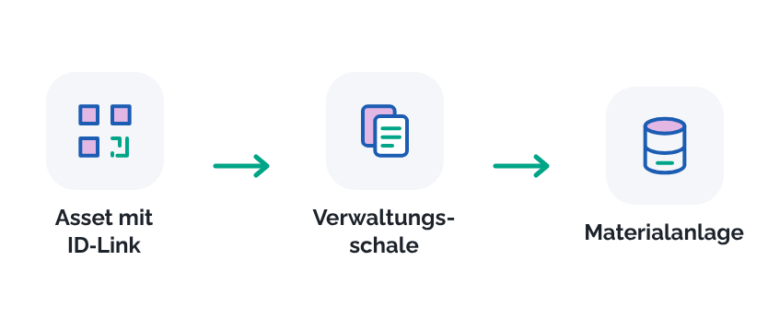
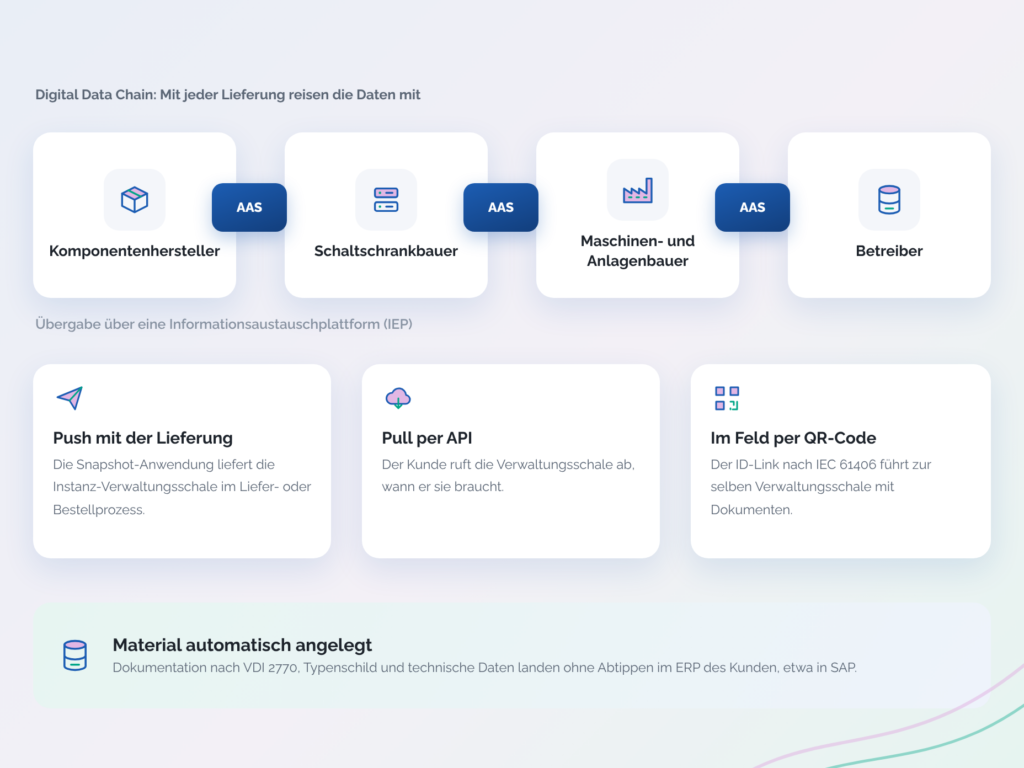
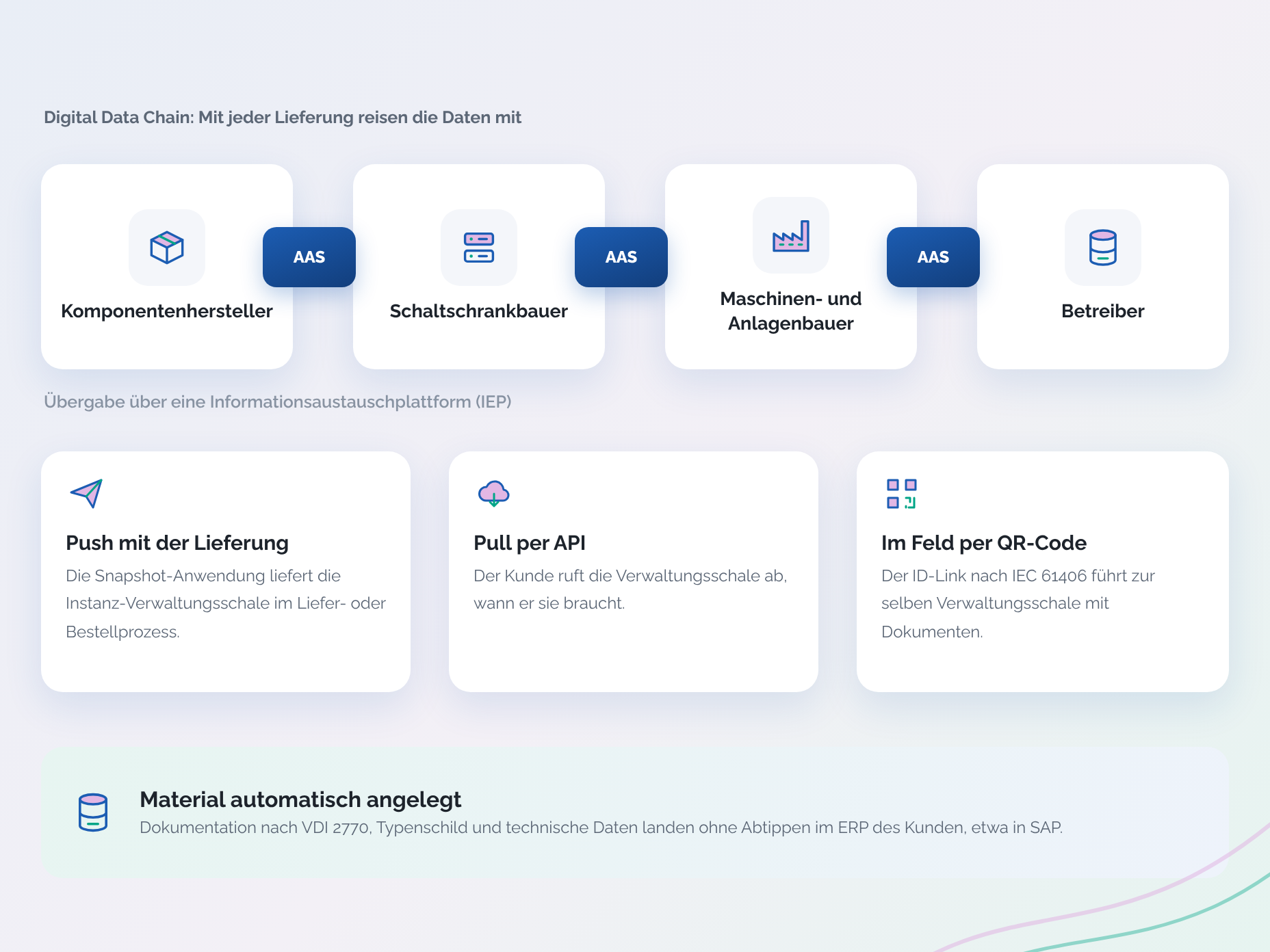
The Digital Data Chain (DDC) is the end-to-end digital exchange of technical product information along the supply chain, from the manufacturer through planners and plant constructors to the operator. It is based on three clear requirements: unique identification of each asset according to IEC 61406, standardized documentation according to VDI 2770, and a cloud-based information exchange platform (IEP) through which data is transferred. This approach is driven by the Digital Data Chain Consortium (DDCC) from the process and pharmaceutical industries.
Neoception AXON generates the instance Asset Administration Shell per asset and provides it: as a push via the snapshot application, triggered during the delivery or ordering process, or as a pull via the on-demand AAS Repository API. The customer automatically adopts the data, for example, for material creation in SAP, which we implement together with our partner D&TS.
At every handover between manufacturer, planner, and operator, technical information is recaptured: typed out manually from PDFs or read off the nameplate. This wastes time and introduces errors.
Request DemoData is transferred manually into the ERP system from data sheets, websites, or emails.
Where automation exists, it is typically proprietary and limited to a single supplier.
Suppliers receive the same requirement from numerous customers, each with slight variations.
Internal sales and service teams repeatedly answer inquiries regarding certificates and documents.
From the manufactured asset to the QR code scan in the field: the same Asset Administration Shell, at every point.
AXON generates an Asset Administration Shell for each asset containing the required submodels.
Result: one Asset Administration Shell per instance.
Snapshot provided upon delivery, or retrieved by the customer via API.
Result: the path your customer wants.
The customer automatically imports the data, for instance into SAP.
Result: Material creation without manual typing.
The QR code compliant with IEC 61406 leads to the same Asset Administration Shell containing the documents.
Result: Maintenance with all information at hand.
Why Neoception
Snapshot for delivery, repository API for retrieval: both channels with a single product.
The Asset Administration Shell follows the standard, not an individual customer. You serve everyone with the exact same effort.
Asset Administration Shell with IDTA submodels, readable for platforms like SAP BNAC.
Technology
The Asset Administration Shell is the preferred approach because it is interoperable, standardized, and scalable. Documentation follows VDI 2770, and data transfer is handled via an Information Exchange Platform (IEP).
Integration & IT in detailAsset Administration Shell (IEC 63278)
Snapshot application
On-demand AAS Repository API
Nameplate, documentation (VDI 2770), technical data
QR code according to IEC 61406
e.g., SAP BNAC
The benefit lies with the customer, while the effort can be multiplied at the supplier's end.
Data readiness, identifier on the asset, and assignment of the instance in the delivery or ordering process.
Instance Asset Administration Shell with the submodels, provided via push or pull.
Takes over the Asset Administration Shell in the ERP or platform and automatically creates material records.
In the Basic Integration Workshop, we use your Digital Data Chain (DDC) lead use case to clarify what customers demand, which approach fits best, and what data is already available.
Request WorkshopTrial · Workshop · Enablement
The result is a running pipeline for your DDC lead use case, representing the initial expansion stage of your future productive solution.
READ MORE
How material creation works with D&TS and what happens after delivery.
Partnership
Joint use case: automated material creation in SAP.
To the article D&TS: D&TS: From ECLASS to Asset Administration Shell
Use case
Once the asset is created, changes reach the customer via the same route.
To the PCN use case: Product Change Notification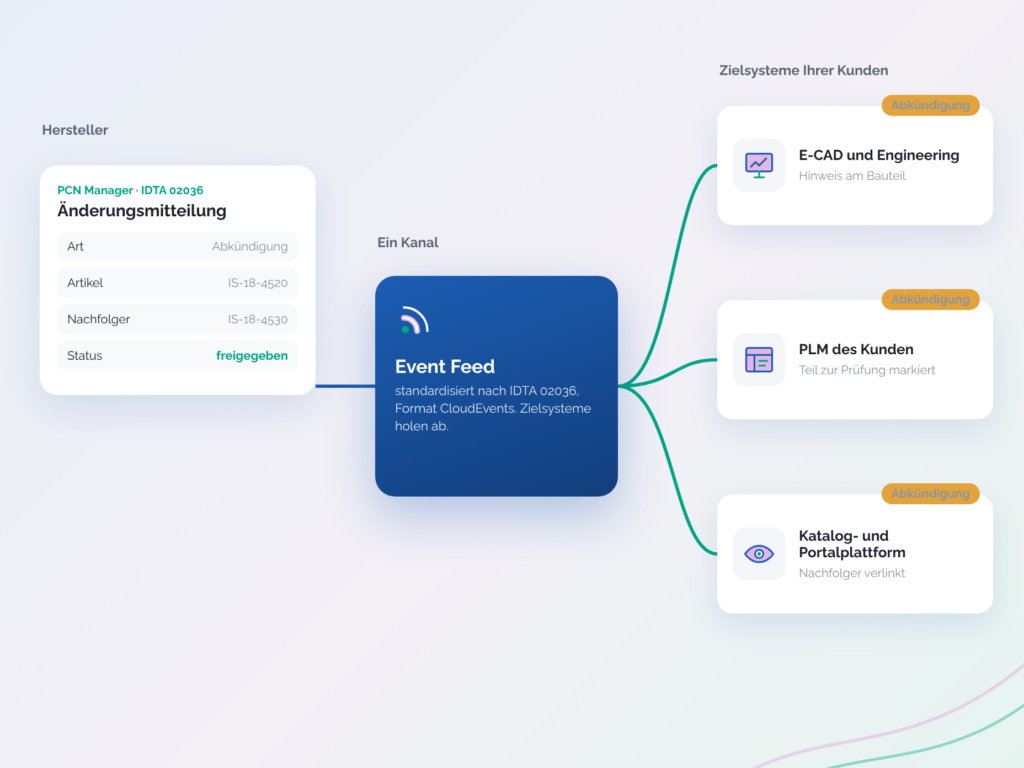
Use case
The same Asset Administration Shell also carries the content of the product passport.
To the DPP use case: Digital Product Passport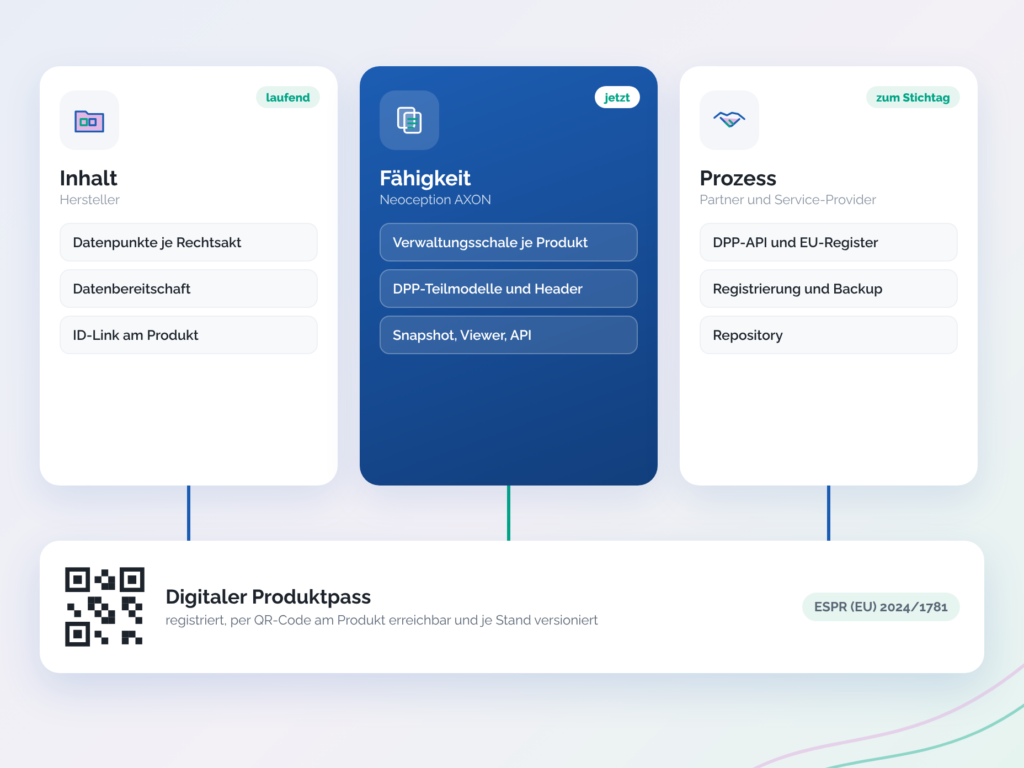

Your customers demand data upon delivery? We show you how to provide the data once and serve every customer with it.
Free and without obligation.
Briefly let us know which customers are requesting what data and which systems you use.


Briefly answered: Digital Data Chain, push and pull, content and benefits.
The Digital Data Chain (DDC) is the end-to-end digital exchange of technical product information along the supply chain. It requires unique identification according to IEC 61406, standardized documentation according to VDI 2770, and a cloud-based Information Exchange Platform (IEP).
DDCC stands for Digital Data Chain Consortium. It drives the Digital Data Chain in the process and pharmaceutical industries, which this use case follows. However, the mechanism applies to every link in the supply chain and across other industries.
That depends on the supplier. Machine and plant builders know their customers and project numbers and often deliver via push. For component manufacturers with make-to-stock production, pull is easier because the customer retrieves the data when needed. Neoception AXON offers both.
Currently mainly Digital Nameplate, Handover Documentation, and Technical Data. The list is subject to change; templates for process sensors, for example, are in development. Additional submodels for further use cases are permitted.
You meet supplier requirements of major customers early, are prepared for tenders of new plants, answer fewer individual document inquiries, and serve many customers with the same setup—even those who do not yet demand it.
The QR code on the asset leads to the same Asset Administration Shell with documents and data in the field. Product changes can later be provided via the same path, see Product Change Notification.
You are currently viewing a placeholder content from Hubspot Embedded Content. To access the actual content, click the button below. Please note that doing so will share data with third-party providers.
More InformationYou are currently viewing a placeholder content from HubSpot. To access the actual content, click the button below. Please note that doing so will share data with third-party providers.
More InformationYou are currently viewing a placeholder content from Hubspot Meetings. To access the actual content, click the button below. Please note that doing so will share data with third-party providers.
More Information